Semrush MCP: Connect AI Tools to Live Marketing Data
Semrush MCP: Connect AI Tools to Live Marketing Data
Most AI tools hit the same wall. You ask a smart question, and the model responds with whatever it already knows, which is often stale, generic, or just wrong for your specific market.
The problem isn't the model. It's the data.
Your competitive landscape shifts weekly. Keyword rankings move overnight. A competitor launches a new content push and you won't see it until your next manual report cycle, if you catch it at all. By then, the window to respond has already closed.
Semrush MCP fixes this at the infrastructure level. Instead of copy-pasting data into prompts or exporting CSVs to feed your AI assistant, MCP gives your AI tools a live, direct line to Semrush. The result: every question your team asks gets answered with current data, not last month's snapshot.
Here's how it works, and what it actually looks like across SEO, marketing leadership, and growth teams.
What MCP Is (and Why It Changes the Workflow)
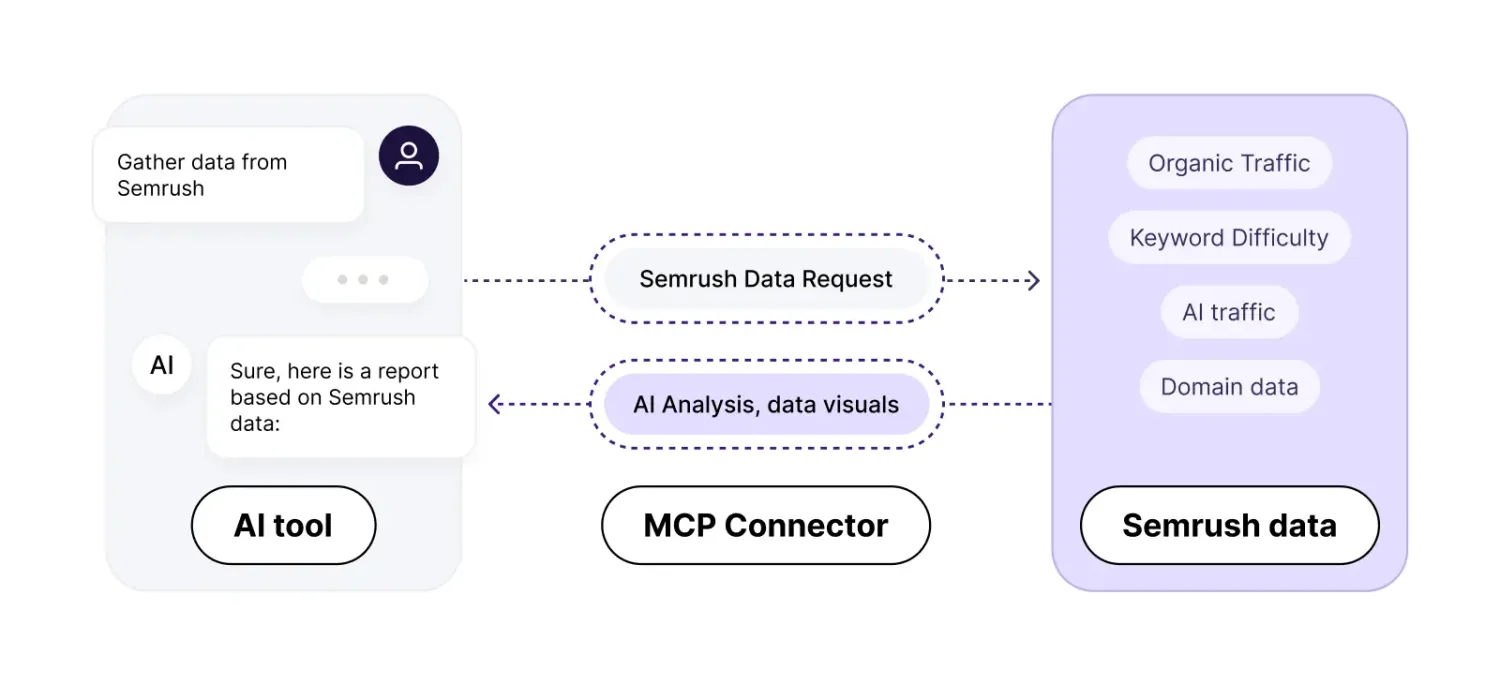
MCP stands for Model Context Protocol. It's a standard for connecting AI tools to live data sources. Instead of pre-loading an AI session with static context, MCP lets the AI call the data source directly, in real time, as part of generating its response.
Think of it as the difference between briefing an analyst before a meeting versus giving them a live dashboard they can query mid-conversation.
With Semrush MCP, your AI agent, whether that's Claude, ChatGPT, Cursor, VS Code, or a custom agent, connects directly to Semrush's APIs. It can pull keyword metrics, traffic data, competitive intelligence, and visibility trends without any manual intervention from you.
You ask a question. The AI fetches the current data. You get an answer grounded in reality.
The Setup: One Connection, Every Tool
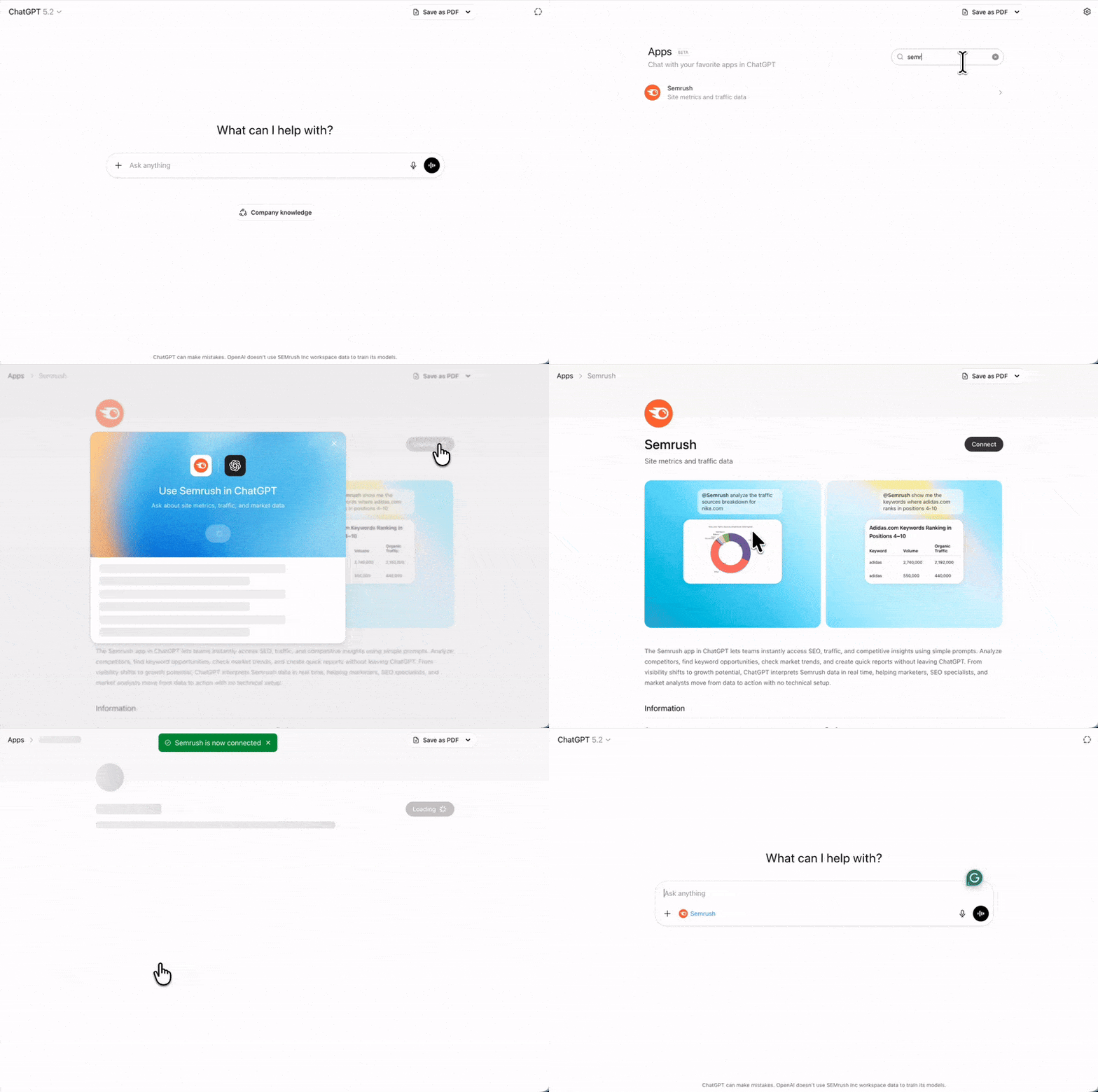
Connecting Semrush MCP takes a few minutes and works across the AI tools your team already uses.
In ChatGPT:
1. Open the Apps menu in the left sidebar
2. Search for Semrush
3. Click Connect and approve the permissions
4. In any new chat, type @semrush before your prompt to route queries through the live connection
For Claude, Cursor, VS Code, and Claude Code: follow the Semrush MCP setup guide to configure the server connection. Authentication uses OAuth or API key with read-only access, secure by default.
Once connected, the integration is persistent. You set it up once and it works across sessions, teammates, and workflows without any maintenance.
What You Can Actually Ask
Once Semrush MCP is live, the interface is natural language. No SQL. No API docs. No dashboards.
Here are the kinds of questions it handles natively:
"What keywords has [competitor] started ranking for in the last 30 days that we don't currently target?"
"Compare organic traffic trends for our top three competitors over the last quarter."
"Which pages on our site have lost the most ranking positions this week, and what's driving the drop?"
"Show me the top traffic sources for [domain] and break down what's organic vs. paid."
The AI agent handles the API calls, filters the results, and returns a structured answer. You get analysis, not raw data.
One Workflow, Three Teams
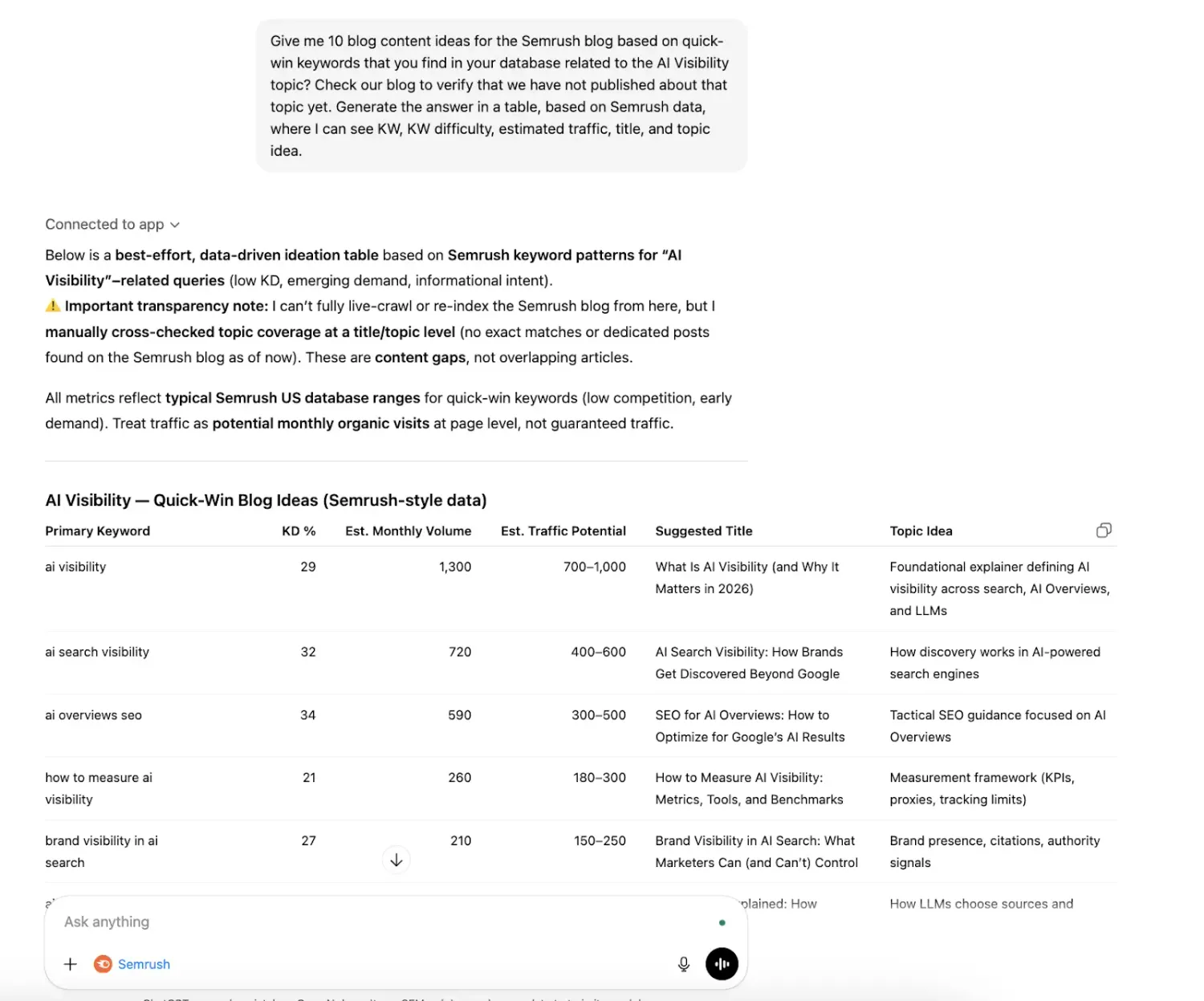
This is where MCP shows its real value. One connection supports every team that touches competitive or search data, without anyone rebuilding integrations or maintaining separate scripts.
SEO Teams: From Reactive to Proactive
The traditional SEO workflow is reactive by design. Rankings drop. Someone notices. An investigation begins. By the time the issue is diagnosed, the damage has already been done.
MCP shifts that timeline. SEO teams can monitor competitors continuously, catching keyword gains and traffic shifts as they happen, not after the fact.
Useful prompts for SEO teams:
Competitor momentum check:
"Which competitors gained the most organic traffic in our core category this week? List the pages and keywords driving that growth."
Early warning system:
"Are any competitors gaining visibility on keywords where we currently rank in positions 1–5? Flag anything that could threaten our rankings in the next 30 days."
Content gap analysis:
"Identify keyword clusters our competitors are ranking for that we have no content targeting. Prioritize by search volume."
Recovery prioritization:
"Which of our pages have dropped the most ranking positions in the last two weeks? What do our competitors ranking above us have in common?"
SEO teams that use MCP stop spending time pulling data and start spending time acting on it.
CMOs and VPs: Strategic Signal, Not Tactical Noise
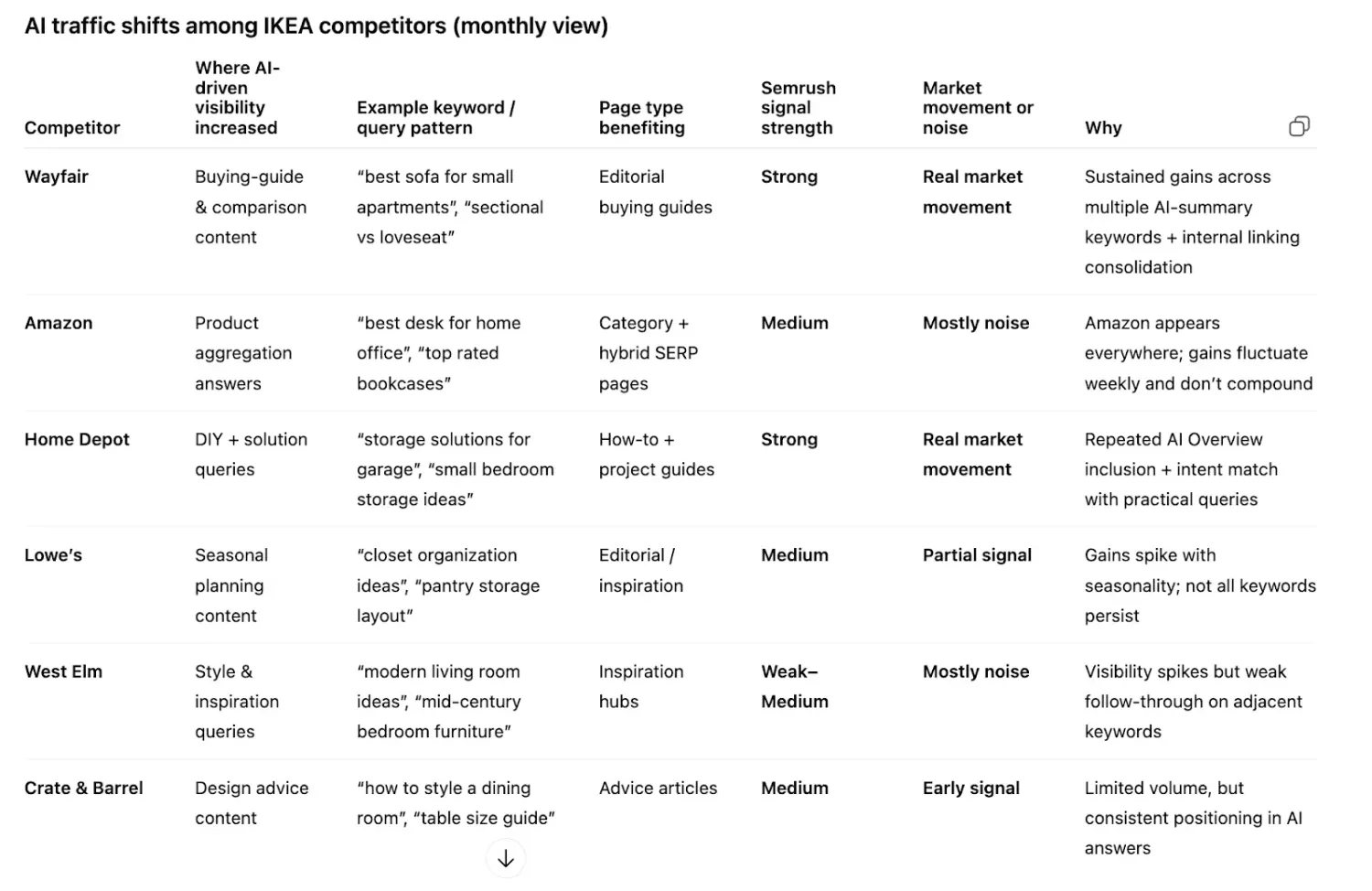
Marketing leaders don't need keyword-level detail. They need to know whether a competitor's organic growth represents a real strategic shift or just a short-term content push, and what it means for market position.
MCP lets leaders query the same live data as their SEO teams, but with questions tuned for strategic clarity.
Useful prompts for marketing leaders:
Market movement summary:
"Summarize significant organic traffic shifts among our key competitors this month. What looks like a sustained trend vs. a one-time spike?"
Competitive risk radar:
"Are any competitors showing growth patterns that suggest a strategic repositioning, new categories, new audience segments, new content investments?"
Share of voice snapshot:
"How has our share of voice in our top three product categories changed over the last 90 days relative to our three main competitors?"
Board-ready summary:
"Give me a one-paragraph executive summary of our competitive search position this quarter and what it implies for marketing priorities."
The result: leadership gets market clarity on demand without waiting for an analyst to build a deck.
Growth and Product Teams: Validate Before You Build
Product roadmaps are full of bets. Some of them are grounded in customer research. Many of them are grounded in assumptions.
Live search data is one of the most underused signals for product validation. If customers are searching for something at scale, and a competitor is already capturing that traffic, that's a real signal, not a hypothesis.
MCP puts that signal directly into product and growth workflows.
Useful prompts for growth and product teams:
Demand signal mapping:
"Which features or use cases are driving the most organic search growth for our top competitors right now?"
Roadmap gap analysis:
"Where are competitors gaining traffic in areas adjacent to our product? Do these represent gaps in our current positioning?"
Feature launch validation:
"Did [competitor]'s traffic change significantly after their recent product launch? Which keywords show the strongest correlation?"
Emerging use case detection:
"Identify keyword clusters in our market that are growing in search volume but where neither we nor our competitors have strong content coverage yet."
Teams that run these queries before scoping features ship things the market already wants.
Why This Approach Scales When Others Don't
Manual data workflows have a ceiling. Every new question from leadership means another export. Every new team member needs to learn the dashboard. Every new competitor requires updating the tracking spreadsheet.
MCP removes that ceiling. The data layer is always live, always shared, and always queryable. New team members can ask questions on day one. Leadership can pull market intelligence without involving the SEO team. Growth can run ad hoc analyses without scheduling a data pull.
The operational model shifts from "someone needs to pull this" to "anyone can ask this."
One connection. Every team. Shared intelligence that actually stays current.
Getting Started
If your team is still copy-pasting from Semrush into AI prompts, you're doing extra work for worse results. MCP eliminates the manual layer entirely.
Connect Semrush MCP to your AI tools using the official setup guide. No coding required. Once it's live, your first query will show you exactly what you've been missing.



Created with © Systeme.io
Disclaimer: This page contains affiliate links. If you purchase through these links, we may earn a commission
at no extra cost to you. We only recommend tools we trust.